Ask Doza
Ask the recording anything, in plain words. Answers come back as clips you can play and keep.
Interviews, podcasts, keynotes, panels, webinars. Doza Assist reads every word like a story producer, finds the best moments and builds a rough cut you open in Final Cut Pro, Premiere Pro or DaVinci Resolve. It runs on your Mac. Nothing uploads.
Explore what this interview is really about. Ask about themes, moments, or pull clips when you’re ready.
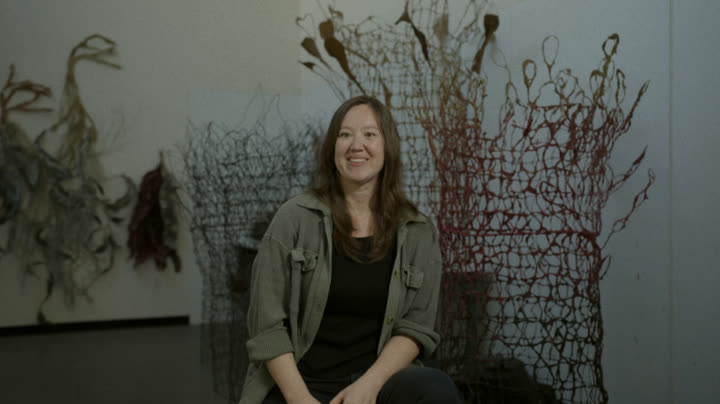
How did I get into paper making? I went to graduate school for printmaking. There was a person there doing sculptural paper making, started using paper pulp for my work, and I’ve just never stopped ever since then. Why? I think I just really love how hands-on and what a slow process it is.
So I think it just kind of clicked, like, oh, I can make these sculptures that will protect the baby trees, look like seaweed sculptures.
I think the land, the soils, what has happened, how much disturbance has been there, how much care has been there…
Artist: May Babcock · papermaking artist · real interview
“…going through all of that to build a rough cut could take me days. With Doza Assist, I can get that initial rough cut together in about 20 minutes.”
 Larry Flaxman
Best-selling author, screenwriter and researcher
YouTube · 160K subscribers ↗
Larry received a complimentary license.
Larry Flaxman
Best-selling author, screenwriter and researcher
YouTube · 160K subscribers ↗
Larry received a complimentary license.

Ask the recording anything, in plain words. Answers come back as clips you can play and keep.
Learns how you open, pace and land a story from cuts you’ve finished.
Send a link. Your producer picks selects in a browser, and they land in your project.
Bring in a multicam FCPXML from Final Cut Pro or DaVinci Resolve. Your selects go back on the same angles, with video and audio in sync.
Why most round trips break →Every recording from a shoot in one project. Chat, Story Brief and exports work across all of them.
Let Claude Desktop, Codex, Cursor or VS Code read the projects you switch on.
Same engine in every plan. No usage caps, no credit meters. Your video never uploads; a Studio share link sends only compressed audio, transcript, analysis, clips and documents.
Try before you buy · Requires a Mac with Apple Silicon (M1 or later)
Anything with people talking: interviews, podcasts, keynotes, panels, webinars, events. If there’s dialogue, Doza Assist transcribes it, finds the strongest moments and builds a rough cut.
Yes. Import a multicam FCPXML from Final Cut Pro or DaVinci Resolve. Doza Assist transcribes the angle set as the audio source, and the FCPXML Round-Trip export puts your selects back on the same angles with video and audio in sync. How the round trip works
A web browser. No app and no account. They read the transcript, play clips, save selects with notes, and download the transcript or quote sheet as Word, PDF or Excel. Share links come with Studio.
No. Transcription and AI run on your Mac, and your video never uploads in any mode. Two things are opt-in: your own Claude or OpenAI API key (transcript text only), and a Studio share link (compressed audio and text, deleted when you expire the link).
Any Mac with Apple silicon, M1 or later. Intel Macs aren’t supported. 16 GB of memory is the minimum we test against.
It transcribes about 100 languages and writes its notes in 30 of them, set per project. Quotes always stay in the language they were spoken.
Try it free first. If you buy and it doesn’t work for you, email within 30 days for a full refund.
Download the app, drop in a recording and see what Doza finds. Every feature works on the first 2 minutes of any file.
No account, no card · your video never leaves your Mac
Built by Chris Cardoza, 15 years cutting documentaries and branded work for Reebok, TB12 Sports, Yo-Yo Ma and ICA Boston. He built Doza because no tool worked on his machine, in his voice, without a meter. More about the maker →